
360 vs Standard Product Photography for Ecommerce
Choose 360 product photography when shoppers need to inspect shape or important features across multiple sides and that rotational visibility justifies the extra capture, consistency, and sequence-assembly work. Choose standard product photography when a purposeful set of fixed hero, alternate, and close-detail views can answer the important visual questions; combine both when rotation provides spatial coverage and stills provide distinct detail emphasis. Neither format by itself guarantees higher engagement, conversion, satisfaction, or lower return rates.
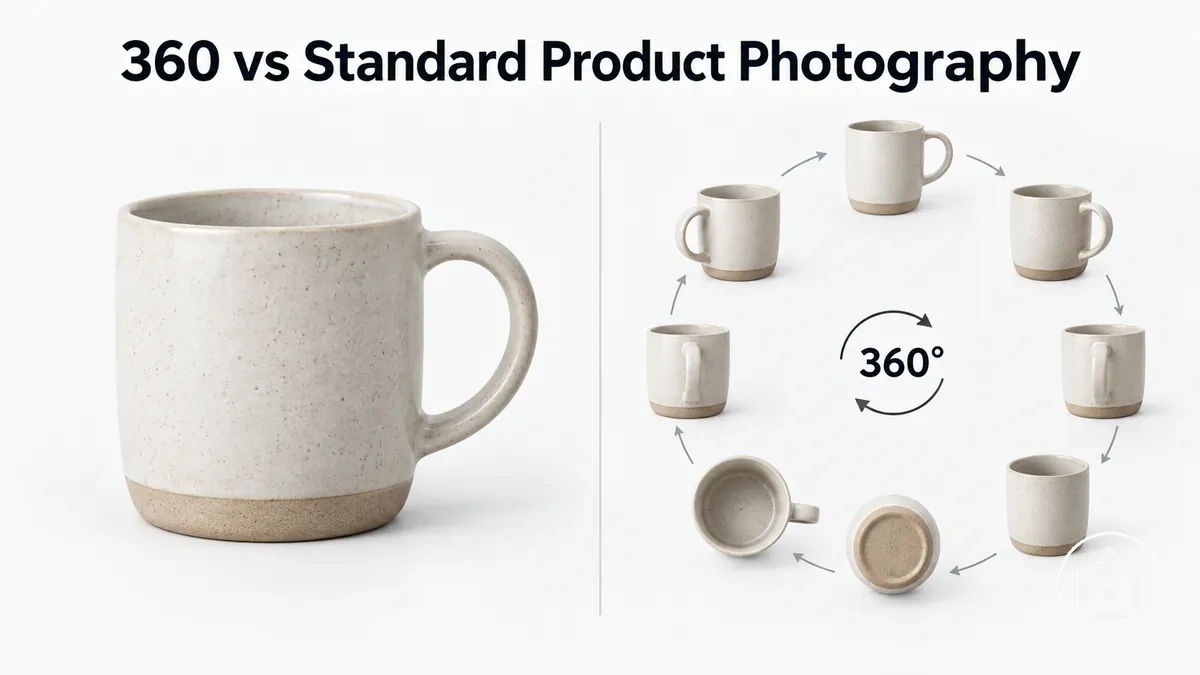
360, standard, or both? Use the information need as the decision rule
Match each format to the visual question it answers. Rotational coverage is valuable when relationships between viewpoints matter; selected stills are valuable when deliberate framing makes a feature faster or clearer to inspect.
Choose 360
Best fit when important shape, controls, openings, or surfaces are distributed around the product and the shopper benefits from controlling the viewpoint.
Production condition: capture positions must form a consistent sequence, with rotation control, cross-frame consistency, and sequence assembly.
Choose standard
Best fit when deliberately selected views can communicate overall form, alternate sides, close details, scale, or context without meaningful information loss from the absence of continuous rotation.
Production condition: each still can be composed and handled independently for its communication role.
Combine both
Best fit when rotation and stills answer different questions—for example, rotation explains spatial relationships while a close-up isolates a small control, marking, or texture.
Use both only when: each format adds distinct information rather than duplicating views already communicated clearly.
Decision rule: if rotational inspection adds unique information and the production workflow can support a connected sequence, 360 is justified. If selected views can communicate the same information clearly, standard stills are sufficient. Use both when their roles are complementary.
Table of Contents
Key Differences Between 360 and Standard Product Photography
360 product photography and standard product photography differ most in viewer control, angle coverage, detail emphasis, and production requirements.
A 360 rotational sequence gives the shopper control over rotational viewpoints, while standard product photography presents photographer-selected still views that deliberately emphasize particular angles or product details.
The image illustrates one supporting distinction: 360 product photography depends on continuity between successive rotational views, whereas standard product photography can treat each selected view as an independent composition.

The comparison below applies the same criteria to both formats so each structural difference and its practical implication can be evaluated consistently.
| Comparison criterion | 360 product photography | Standard product photography | Practical implication |
|---|---|---|---|
| Viewer control | Allows the shopper to rotate through viewpoints contained in the rotational sequence. | Presents selected still views chosen and composed by the photographer. | Rotational viewpoint control sits with the shopper in a 360 view, while viewpoint selection remains with the photographer in a still gallery. |
| Angle coverage | Provides sequential coverage around the product when the required rotational views have been captured consistently. | Provides coverage from the fixed perspectives included in the still gallery. | A rotational sequence can expose intermediate angles, while selected still views concentrate attention on deliberately chosen perspectives. |
| Product detail | Shows product detail across the captured rotation, although specific small features may still need dedicated close views. | Allows individual frames to emphasize specific features, textures, controls, or close detail through composition. | Continuous angle coverage and deliberate feature emphasis answer different inspection needs. |
| Production requirements | Requires consistency across the rotational sequence and handling of the images as a connected set. | Uses independently composed still images that can be captured and managed as separate assets. | 360 production involves sequence consistency and assembly, while standard photography has a simpler relationship between individual assets. |
The central distinction is therefore structural rather than a claim that one format performs better overall.
360 product photography prioritizes continuous rotational coverage and shopper-controlled viewing, while standard product photography prioritizes selected still views and deliberate feature emphasis; which difference matters most depends on the product and the information shoppers need to inspect.
Interactive Rotation vs Selected Still Views
Interactive rotation gives the shopper control over rotational inspection, while selected still views present viewpoints chosen by the photographer.
In a 360 spin, shopper control applies to movement through the captured rotational image sequence; with selected still views, the photographer determines which fixed viewpoints the shopper can inspect.
The image illustrates this viewing distinction by showing the same product with rotational continuity and with three or four deliberately selected fixed viewpoints.
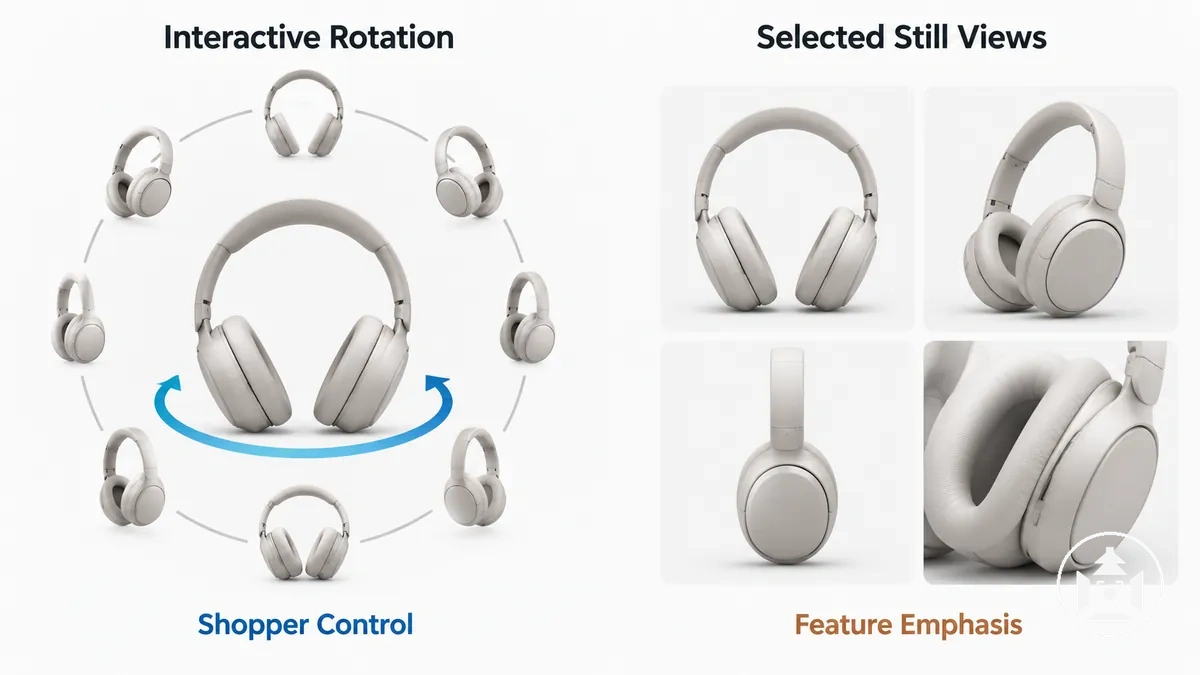
Interactive rotation preserves continuity between successive captured viewpoints, letting the shopper move around the product within that rotational sequence.
Selected still views do not provide the same continuity; instead, each viewpoint can use composition or a close-up for deliberate feature emphasis.
A 360 product spin is a sequenced rotational view of the product, not the same as a 360-camera panorama or a fully navigable 3D model.
The distinction is therefore about who controls viewpoint selection and whether the presentation prioritizes rotational continuity or photographer-curated emphasis.
Product Coverage and Detail Control
Useful product coverage depends on which product features need to remain visible across changing angles and which require deliberate close framing.
A 360 view can provide continuity across side, rear, and intermediate surfaces, while selected still images can isolate a viewpoint or close detail for stronger feature emphasis.
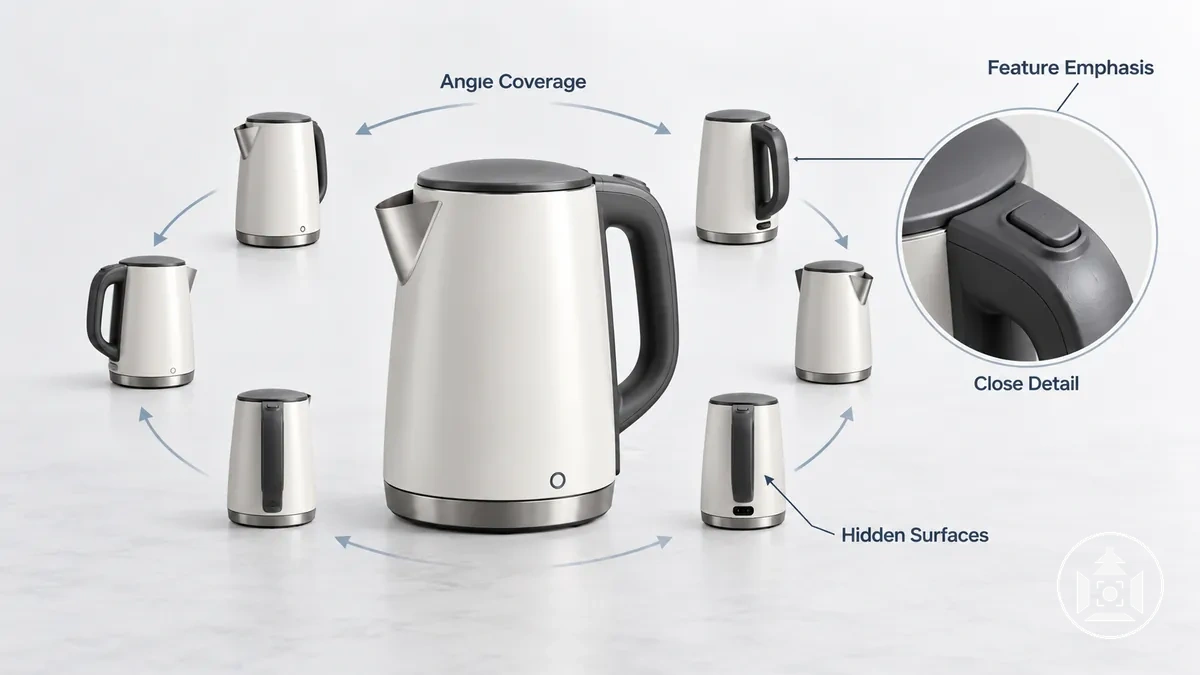
The main coverage and detail attributes map each product feature to its visibility condition, the format capability that exposes or emphasizes it, and the resulting value for shopper inspection.
- Angle coverage: Features distributed around the product can benefit from rotational visibility because successive viewpoints expose surfaces that are not visible from a single fixed position, giving shopper inspection continuity around the object.
- Hidden surfaces: Rear, side, recessed, or partially obscured features become inspectable when the chosen viewpoint exposes them; rotational coverage can reveal these surfaces as the product turns, while an alternate still can target a specific area directly.
- Feature emphasis: A control, opening, connector, or other localized product feature may be visible within a rotation but remain visually small. A deliberately composed still can select the relevant viewpoint and frame that feature more prominently.
- Close detail: Fine texture, material finish, markings, or small construction details can benefit from a close-up rather than broader angle coverage when the inspection need is concentrated on a small area.
- Shape and profile: When understanding a product depends on how its form changes from front to side to rear, rotational continuity can expose that changing profile. When one profile carries the relevant information, a selected alternate view can emphasize it without relying on intermediate angles.
For example, a product with controls on one side and an opening at the rear can use rotational coverage to establish where those features sit relative to the overall shape, while selected close-ups can emphasize the controls or opening themselves.
Deliberate viewpoint selection for these visibility needs is part of product photography angles and shot coverage.
Capture Requirements and Workflow Trade-Offs
The main workflow difference is that 360 product photography depends on capture repetition with positional consistency across a connected rotational sequence, while standard product photography uses a selective set of independently composed still captures.
That sequence requirement adds coordination because framing, rotation control, and sequence handling must remain consistent enough for the captured views to function together.
The comparison below organizes the main requirements by their operating condition and resulting production consequence.
| Workflow requirement | 360 product photography | Standard product photography | Production consequence |
|---|---|---|---|
| Capture repetition | Involves repeated captures as the product moves through successive rotational positions. | Uses selected captures for the viewpoints required by the still-image set. | The rotational sequence creates a repeated capture cycle, while still capture can concentrate production effort on individually selected views. |
| Positional consistency | Requires consistent product placement and framing between successive views so the sequence remains visually coherent. | Allows each selected frame to be composed independently for its intended viewpoint. | Changes to product position or framing can affect continuity across a rotational sequence, whereas an individual still can be adjusted without maintaining continuity with neighbouring frames. |
| Rotation control | Requires controlled changes in rotational position between captures; the mechanism may be manual or automated depending on the production process. | Does not require a connected rotational sequence because selected viewpoints can be positioned and captured independently. | 360 capture adds coordination between product rotation and repeated image capture without making a particular equipment method universally necessary. |
| Asset count and handling | Produces a connected set of rotational images that must remain correctly associated for sequence assembly. | Produces a selected set of independent still assets that can be handled according to each image's purpose. | A rotational set creates greater interdependence between assets, making sequence handling part of the production workflow. |
| Retakes | A framing, positioning, or continuity problem may require retaking an affected view and other views when necessary to restore sequence consistency. | A problem confined to one selected still can be corrected by retaking that individual composition without maintaining rotational continuity. | Retake scope is conditionally broader for a rotational sequence when an error affects continuity, while errors isolated to independent stills can remain local to those captures. |
| Post-capture assembly | Involves organizing the captured rotational views in their intended order for sequence assembly. | Uses selected images as separate views and does not inherently require rotational sequence assembly. | Sequence assembly adds a handling stage to 360 production that is not inherent to a standard still-image set. |
The image illustrates a narrower supporting aspect of this production burden: maintaining a consistent product-and-camera relationship across successive rotational positions, compared with composing selected still captures independently.
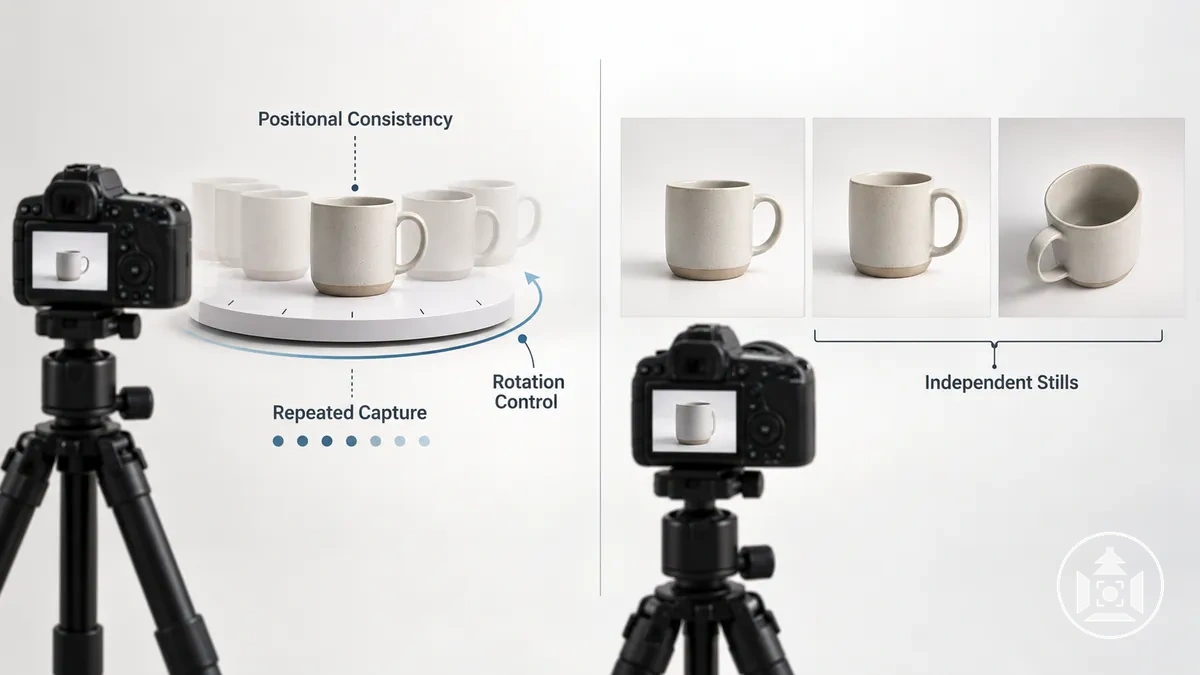
Total production effort depends on the product, required coverage, production scale, equipment, and degree of manual or automated handling, so these structural differences do not establish a fixed production time or universal equipment requirement.
Detailed implementation choices belong to the broader product photography workflow.
360 Capture Uses an Evenly Spaced Rotational Image Sequence
A 360 rotational image sequence is built from repeated still captures taken at evenly spaced positions around a full rotation.
Stable product placement and consistent framing allow each image to represent the next capture position while preserving visual continuity between frames.

Consistent lighting helps keep illumination stable while the product changes rotational position.
Stable product placement, consistent framing, and a consistent rotation interval keep successive capture positions aligned as parts of the same rotational sequence.
The interval can vary with the product, desired smoothness, platform, and production constraints rather than following one universal frame count or degree interval.
The capture sequence progresses from a stable starting position through repeated rotation and capture, with sequence verification confirming continuity before assembly.
- Stabilize the product and camera: Place the product securely on the rotational surface and keep the camera framing fixed; verify that the product remains aligned within the intended composition.
- Establish the starting position: Set a clear initial rotational position; verify that the starting point can be identified when checking completion of the full rotation.
- Apply the rotation interval: Rotate the product by the chosen consistent interval; verify that each new position follows the same interval pattern.
- Capture repeatedly: Capture one image at each position while maintaining consistent framing and consistent lighting; verify that each capture corresponds to its intended rotational position.
- Complete the full rotation: Continue the rotate-and-capture cycle until the intended full rotation is covered; verify that no required capture position has been omitted.
- Verify sequence continuity: Review the image sequence for missing frames, unexpected alignment changes, or interruptions in rotational progression; confirm assembly readiness before moving to the next production stage.
The exact frame count and rotation interval are separate production choices rather than universal requirements; they depend on the product, desired rotational smoothness, delivery platform, and production constraints.
Image Count and Rotation Intervals Affect Spin Smoothness and Production Effort
Frame count and rotation interval control the sequence density of a 360 spin: denser sequences generally reduce visible jumps between adjacent views, but they also increase production effort because more images must be captured, processed, stored, and transferred.
Frame count alone does not guarantee spin smoothness because alignment and playback behavior also contribute to perceived continuity.
For equally spaced frames over a full 360-degree rotation, rotation interval = 360° ÷ frame count; increasing the frame count therefore decreases the angular gap between successive images.
Sirv illustrates this relationship with 360 spins using 8, 12, 18, 24, 36, and 72 images, while noting the trade-off between smoother-looking rotation and the additional photography and download burden of more images.
The examples below apply the same angular relationship to illustrate how sequence density changes continuity and production effort; they are examples rather than prescribed standards.
| Illustrative frame count | Rotation interval | Continuity state | Production implication |
|---|---|---|---|
| 12 images | 30° between frames | Lower sequence density, with larger angular changes between adjacent viewpoints | Fewer capture actions and files to process and transfer |
| 24 images | 15° between frames | Higher sequence density, with smaller angular changes between adjacent viewpoints | More capture actions and files than a 12-image sequence |
| 36 images | 10° between frames | Higher sequence density than 24 images, with a smaller angular gap between adjacent viewpoints | More capture actions and files than 12- or 24-image sequences |
| 72 images | 5° between frames | Highest sequence density among these examples, with the smallest angular change between adjacent viewpoints | Greatest capture, processing, and transfer burden among these examples |
These frame counts are illustrative, not universal requirements.
Perceived spin smoothness also depends on consistent alignment, playback behavior, display implementation, and product characteristics, so an appropriate balance between continuity and production effort depends on the specific implementation and production constraints.
360 Production Adds Rotation Control and Sequence Assembly
360 production adds controlled rotation during capture and sequence assembly after capture because the resulting images must remain in the correct frame order and pass cross-frame consistency checks before they can function as an interactive spin.
Asset preparation therefore focuses on preserving sequence integrity rather than treating every frame as an unrelated still image.
File naming should preserve frame order, while each sequence check should identify missing or misordered images before assembly.
Alignment consistency keeps the product in a stable visual position from frame to frame, and exposure consistency and background consistency reduce unintended visual changes across the rotation.
If one image is unusable, a corrected or replacement frame should occupy the same intended sequence position and remain visually consistent with surrounding frames.
A missing, misordered, or visually inconsistent frame can otherwise interrupt the apparent rotation with an unexpected visual jump.
The stages below organize sequence integrity between capture and viewer-ready assembly; when individual frames require preparation or correction, that work forms part of editing ecommerce product imagery rather than redefining the complete editing workflow.
- Prepare: Order and name the captured assets so each image has an unambiguous position in the rotational sequence.
- Check: Verify frame order, alignment consistency, exposure consistency, and background consistency across neighbouring images.
- Correct: Correct an inconsistent image or insert a suitable replacement frame when a missing or problematic frame would interrupt sequence integrity.
- Assemble: Arrange the prepared images in the ordered sequence required by the chosen viewer or delivery implementation, without assuming one specific software or automation method.
- Verify: Review the assembled sequence during playback to confirm that frame order is intact and that missing, misordered, or visually inconsistent frames do not interrupt the apparent rotation.
Standard Photography Uses Independently Composed Still Views
Standard product photography uses selected still views that are individually composed to communicate specific product information rather than form a continuous sequence.
Each image can therefore serve a distinct communication role, with composition controlling which angle, feature, scale cue, or detail receives emphasis.
A hero view can present the product's primary identity and overall form, while an alternate angle can expose a side, rear, or other feature that the primary view does not communicate clearly.
A detail image can isolate a close-up of a texture, control, opening, connection, or other small feature when that information would be difficult to inspect in the wider composition.
The useful set of fixed product views therefore depends on which product information needs to be visible rather than on a fixed image count or prescribed angle set.
For example, a still gallery might use a hero view to establish the product's overall shape, an alternate side or rear view to reveal features outside the primary angle, and a detail image to emphasize a small control or surface characteristic.
Each selected still view answers a different visual question, so selective coverage comes from assigning each independently composed image a clear communication role rather than attempting to simulate continuous rotation.
Shopper Experience Trade-Offs Between 360 and Standard Images
360 and standard product imagery change how shoppers retrieve visual information: an interactive spin provides shopper inspection through viewpoint control, while a still gallery foregrounds selected information through deliberate composition.
The relevant experience trade-offs are interactivity, scan speed, detail emphasis, product understanding, and implementation quality rather than an assumed commercial advantage for either format.
| Shopper interaction attribute | 360 product imagery | Standard product imagery | Condition and experience trade-off |
|---|---|---|---|
| Interactivity | Allows the shopper to move through captured rotational viewpoints. | Presents fixed images for direct viewing without rotational interaction. | Interactivity can help when changing viewpoints answers a product question, but its usefulness depends on the product and implementation quality. |
| Viewpoint control | Lets the shopper choose among viewpoints contained in the rotational sequence. | Places viewpoint selection with the image set prepared for the still gallery. | Shopper-controlled rotation may reduce uncertainty when relevant surfaces or features need inspection from several directions; selected views can be sufficient when the necessary viewpoints are already presented clearly. |
| Scan speed | Requires interaction when the shopper needs to move around the product to locate information at different viewpoints. | Can foreground important information in immediately visible hero, alternate, or detail images. | Selected stills can make a known feature faster to locate when the gallery deliberately exposes it, while rotation can support exploratory inspection when the shopper does not know which viewpoint contains the needed information. |
| Detail emphasis | Makes details visible when they appear within the captured rotational viewpoints, but a small feature may not be strongly emphasized by the spin itself. | Can isolate a feature through a deliberately framed close-up or selected viewpoint. | A still detail image can serve focused information retrieval, while rotation can provide spatial context for where a feature sits around the product. |
| Implementation quality | The experience depends on the interactive spin being presented in a usable way for the shopper's device and interaction context. | The experience depends on clear image presentation and an understandable gallery arrangement. | Either format can become less useful when its implementation makes relevant visual information difficult to access or interpret. |
Rotation is most useful for product understanding when uncertainty concerns shape, relative feature position, or surfaces that become visible as the viewpoint changes.
For example, if a shopper needs to understand how side and rear features relate to the overall form, viewpoint control can help the shopper inspect those relationships rather than relying only on predetermined perspectives.
This possible reduction in uncertainty depends on the rotational sequence actually exposing the relevant information and on the interaction remaining usable.
Curated stills can support faster information retrieval when the important visual questions are predictable and each selected image foregrounds a specific answer.
A hero image can establish overall form, an alternate view can expose a relevant side or rear feature, and a close-up can provide detail emphasis without requiring the shopper to search through a rotation.
In that condition, a well-planned still gallery may already provide the information needed for inspection.
Stronger inspection capability does not by itself establish higher engagement, conversion, satisfaction, or lower return rates.
Those outcomes can depend on the product, audience, implementation quality, surrounding page context, and whether the imagery resolves the shopper's actual information need, so the experience trade-off is best evaluated by user-information fit rather than by a guaranteed business outcome.
360 Views Give Shoppers More Control Over Product Inspection
User-controlled rotation is most useful when important product information is distributed around multiple sides rather than concentrated in one or two fixed viewpoints.
A 360 view allows shoppers to change the viewpoint during product inspection, which can expose side surfaces, rear surfaces, controls, openings, and shape changes that may otherwise remain difficult to infer.
Rotational visibility can help when the product's form changes meaningfully from front to side or rear, because the shopper can inspect how those surfaces connect.
Controls or openings placed on different sides may also benefit from rotational inspection when their position relative to the overall product matters.
This access may reduce uncertainty about hidden or distributed features, but the informational benefit depends on the sequence actually revealing those features clearly.
For example, consider a product with a control on one side, an opening at the rear, and a body shape that narrows toward the back.
User-controlled rotation lets the shopper inspect each characteristic from the viewpoint where it becomes visible and understand how the features relate spatially.
That does not guarantee a better overall experience, because implementation quality, loading behavior, device interaction, and product complexity can still affect how easily the 360 view provides useful information access.
Standard Images Focus Attention on Selected Views and Details
Selected standard product images are effective when important visual information can be deliberately prioritized and framed.
Through composition, selected views can direct attention to a specific product detail, scale cue, or contextual feature instead of requiring the shopper to locate that information while moving through a sequence.
A hero image can foreground the product's overall form and primary visual identity, while an alternate angle can emphasize a side, rear, or functional feature that is less visible from the main view.
A close-up can isolate texture, a control, a label, or another small product detail so it occupies enough of the frame for deliberate detail emphasis.
A scale cue can communicate relative size when the composition includes a familiar reference or relevant context, while contextual framing can show information about how or where the product is used.
These roles can make specific information faster to find when the still gallery prioritizes the visual questions shoppers need answered, although the required coverage depends on the product and its complexity.
For example, if a product has a small control with markings that remain visually minor during rotation, a deliberately framed close-up can foreground the control and its markings directly.
The selected view serves a specific communication purpose: it isolates the relevant feature and gives it greater visual priority, without implying that a fixed number of still images provides sufficient coverage for every product.
Choosing 360, Standard, or Combined Product Imagery
The choice between 360 imagery, standard stills, and combined imagery should follow the product's inspection need and production constraints rather than a universal format ranking.
Suitability depends on whether rotational viewing reveals useful information beyond selected stills and whether the catalogue can support the resulting asset complexity.
Product-information needs provide the first set of selection criteria.
Product complexity and the location of important features determine whether shoppers need rotational inspection, deliberately emphasized close detail, or both.
- Product shape complexity: When understanding the product depends on how its shape changes around multiple sides, a 360 view can add useful rotational visibility; when a few selected views communicate the form clearly, standard stills may be sufficient.
- Side and rear details: When important side and rear details are distributed around the product, 360 imagery can make those viewpoints available for shopper-controlled inspection; when the relevant details occur at predictable viewpoints, selected stills can foreground them directly.
- Close detail: When small controls, markings, textures, openings, or other features require deliberate emphasis, standard close-up images are more suitable for isolating those details; combined imagery can retain rotational context while adding dedicated detail views.
- Catalogue scale: As catalogue scale increases, the feasibility of producing and maintaining the required assets becomes more dependent on available production capacity; standard stills may be more suitable when rotational coverage cannot be maintained consistently across the intended catalogue.
- Production capacity: 360 imagery is more suitable when the production process can support its repeated capture and sequence-handling requirements; standard stills may be sufficient when capacity is better allocated to a smaller set of deliberately composed assets.
- Asset complexity: A 360 view adds a connected rotational asset set, so its suitability depends on whether that additional handling is justified by the information it provides; standard stills keep individual information roles within separate images.
- Incremental information: If rotation reveals product shape, hidden surfaces, or spatial relationships that a strong still gallery does not communicate clearly, 360 imagery adds informational value. If the still gallery already answers the relevant inspection questions, adding rotation may provide limited additional information.
Combined imagery is suitable when the two formats solve different inspection needs, such as using rotation to show changing form and side or rear relationships while selected close-ups emphasize small functional details.
Its feasibility depends on catalogue scale, production capacity, and whether the additional asset complexity produces distinct information rather than duplicating existing views.
The practical choice is therefore conditional: use the format or combination that communicates the required product information within the catalogue's production constraints and acceptable asset complexity.
This decision sits within the broader set of ecommerce product photography types, without making one format universally preferable.
When 360 Product Photography Adds Useful Rotational Detail
360 product photography adds the most useful rotational detail when important visual information changes around the product's sides or is difficult to infer from selected still views.
The inspection value comes from continuity around the object, not simply from the product having multiple sides.
Product shape can justify rotational visibility when its form changes meaningfully from front to side or rear and those changes matter to evaluation.
Side features, rear features, controls, and openings can also add inspection value when their position relative to the overall product is easier to understand through continuous rotation than through isolated views.
Greater product complexity can make a 360 view more useful when several meaningful features are distributed around the object, but that condition does not make rotational capture necessary by itself.
The relevant question is whether rotation exposes hidden or changing information that selected stills would otherwise need many separate angles to approximate.
For example, a product with a control on one side, an opening at the rear, and a body shape that changes around its profile may justify 360 capture because rotation lets the shopper inspect how those features relate continuously around the object.
That added rotational information must still justify the extra production effort and asset handling required for the sequence; if a concise still set already communicates the same information clearly, the incremental value of 360 photography may be limited.
When Standard Product Photography Is Sufficient
Standard product photography is sufficient when purposeful selected still views can answer the product's important visual questions without meaningful information loss from the absence of continuous rotation.
Sufficiency depends on communication completeness: the still gallery must provide the views and close detail needed to communicate the relevant product features.
Product simplicity can make selected still views sufficient when the product shape and important features remain understandable from deliberately chosen perspectives.
Prioritized features can be communicated through composition, while alternate angles can expose relevant side or rear information that the primary view does not show.
Close detail can isolate small controls, markings, textures, openings, or other information that needs greater visual emphasis.
When these fixed views collectively cover the relevant information need, added sequence complexity may provide little incremental information.
For example, a product whose overall form is clear from a primary view, with one important side feature and one small control, may achieve communication completeness through a primary image, an alternate angle, and a close-detail view.
In that condition, standard product photography is sufficient because each likely visual question has a purposeful still-image answer; this is a coverage judgment rather than a claim that fewer assets or standard stills are inherently preferable.
When 360 and Standard Images Complement Each Other
Combined imagery is useful when a 360 view and standard stills perform different information jobs rather than duplicate the same product views.
The 360 view can support broad inspection of overall form and side visibility, while selected stills can provide detail emphasis for information that rotation does not foreground clearly.
The 360 view can cover rotational relationships between the product's front, sides, and rear when those changing viewpoints matter to the information need.
Standard stills can assign separate roles to a hero image, close detail, scale cue, or contextual view through deliberate composition.
The formats therefore have complementary roles when rotational imagery provides spatial coverage and curated stills communicate specific information more directly.
Combined imagery is less useful when both asset types merely repeat information that is already communicated clearly.
For example, a product with controls on different sides and a small textured feature may use the 360 view for broad inspection of its overall form and control locations, while a close-detail still emphasizes the texture and another standard still provides scale or context.
The combination is worthwhile when those assets resolve distinct visual questions; role clarity and non-duplication, rather than a fixed gallery order or asset count, determine whether the formats complement each other.